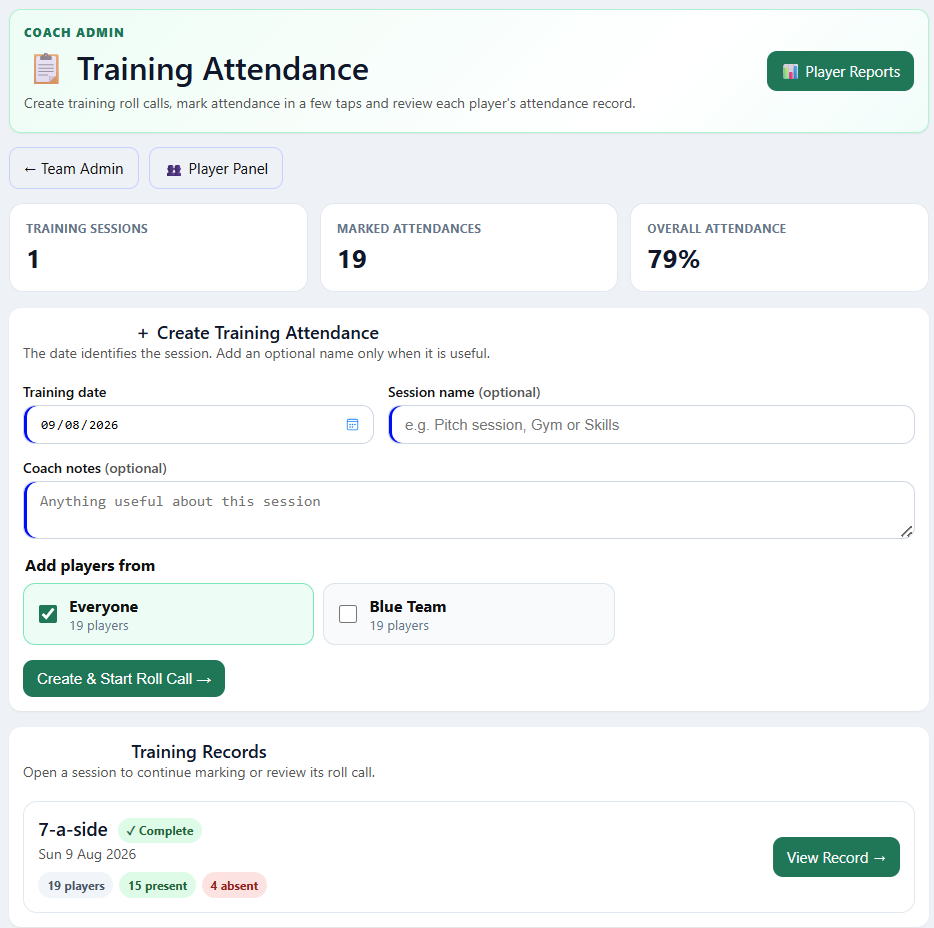
Attendance, in order.
Create training roll calls, choose your groups and record who is present, absent or not required. Review training and match attendance over time.
 Gaelic Stats
Organise your players, send match invites and track the action. Explore each feature below, from squad setup to your full-time review.
Explore the featuresGAA / LGFA / HURLING / CAMOGIE
Set up your team in under a minute.
Start with 5 free games
Phone, tablet or desktop
Works in your browser
Short demonstrations, one feature at a time. On your phone, choose Close-up for a clearer look. Background music is optional.
Import your players once, then organise them into reusable groups for matches and training.
Use the full-screen icon for a larger view. Use Music to turn the background track on or off.
Set up the match, choose your stats and share an invitation that brings player availability together.
Use the full-screen icon for a larger view. Use Music to turn the background track on or off.
Parents or players open the invitation link and respond in a few taps. The coach can see who is available.
Use the full-screen icon for a larger view. Use Music to turn the background track on or off.
Use accepted players to build the match squad, set jersey numbers and get your starting team ready.
Use the full-screen icon for a larger view. Use Music to turn the background track on or off.
Start the clock, record scores and substitutions, then finish with the match breakdown ready to review.
Use the full-screen icon for a larger view. Use Music to turn the background track on or off.
Share the live match link so parents and supporters can follow the score and feed, wherever they are.
Use the full-screen icon for a larger view. Use Music to turn the background track on or off.
Track your internal games with individual stats, identifying player tags and private coaching observations.
Use the full-screen icon for a larger view. Use Music to turn the background track on or off.
Bring attendance, match minutes and individual records together to support your next coaching conversation.
Use the full-screen icon for a larger view. Use Music to turn the background track on or off.
Keep the useful details together, from training attendance to shooting patterns and each player’s progress.
Create training roll calls, choose your groups and record who is present, absent or not required. Review training and match attendance over time.
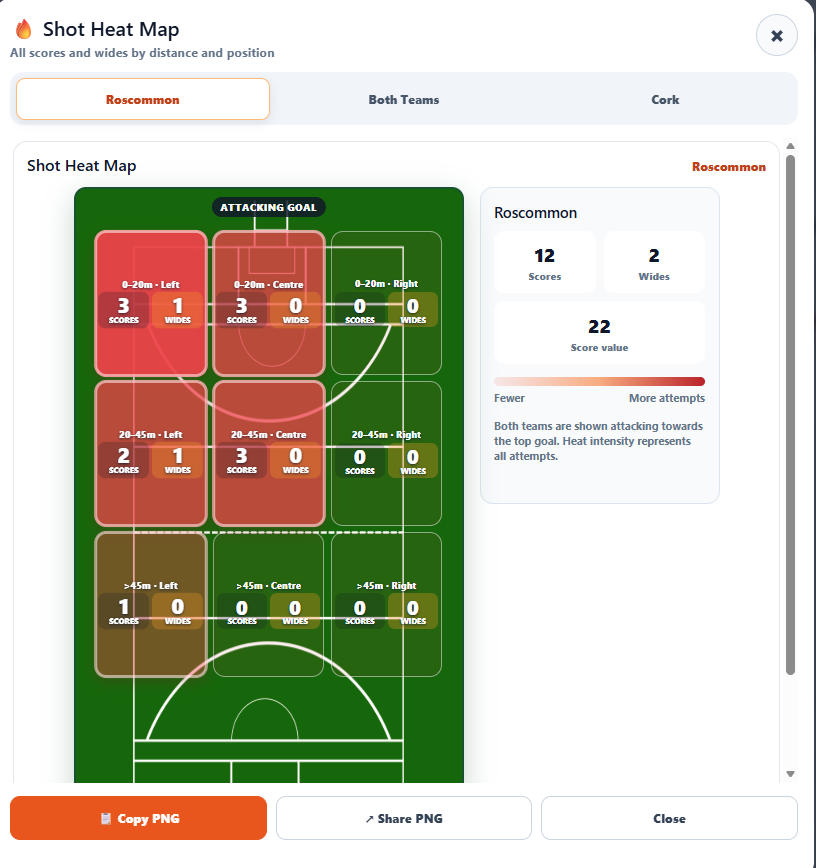
Enable Scoring Distance to build a shot heat map from scores and wides. Compare distance, left, centre and right for your team and the opposition.
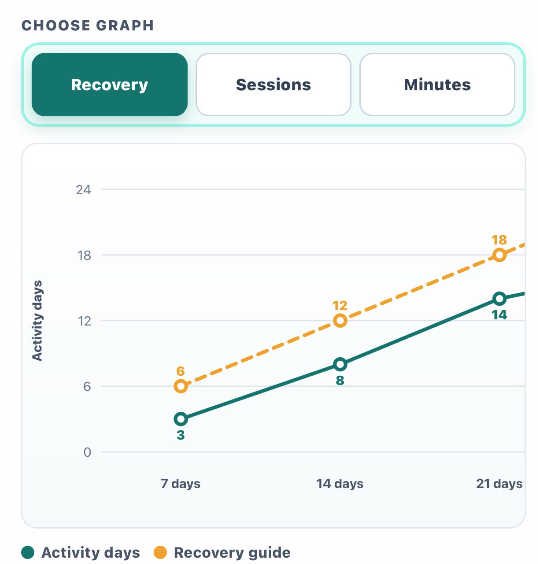
Private PIN-protected profiles bring together match contribution, attendance and recent minutes. Players can link profiles across their Gaelic Stats teams.
Activity views reflect recorded sessions. Recovery guidance supports workload awareness and is not a medical limit.Share live scores, the timer, teamsheets and the match feed. Detailed performance stats stay with the coaches.
Log opposition scorers by jersey number to see where the scoring threat is coming from.
Upload live match photos for supporters to see alongside the action. Save any photos you want to keep.
Start with five games and the full feature set. When your trial finishes, continue with a season pass.
30 games
Full functionality.
Continue when your free trial is complete.
No. Gaelic Stats works in a browser on a phone, tablet or desktop. Parents and supporters follow the links you share.
Spectators can follow the score, timer, teamsheet and scorers. Detailed performance stats remain in coach mode, protected by your team’s PIN.
Tapping Accept or Decline saves the response immediately. An optional comment is saved separately with Save Comment. Parents can change their response later while replies are open.
Yes. Choose Use Accepted Players during match setup, review the imported squad and set your starters and jersey numbers. You can also import further accepted players later.
Get your players organised. Then get on with the game.